Hub
Agent teams
Build agent teams in Hub > Agents and pick one for the IDE, the CLI and Cloud. Covers the starter team, roles and their tools, the agent library and plan limits.

On this page
Jennefer does not use one big agent for everything. Work is shared by a team of specialists, each with a role, instructions and a limited set of tools. You build teams once in Hub > Agents, and each app uses the team you pick for it. Changes reach the apps right away.
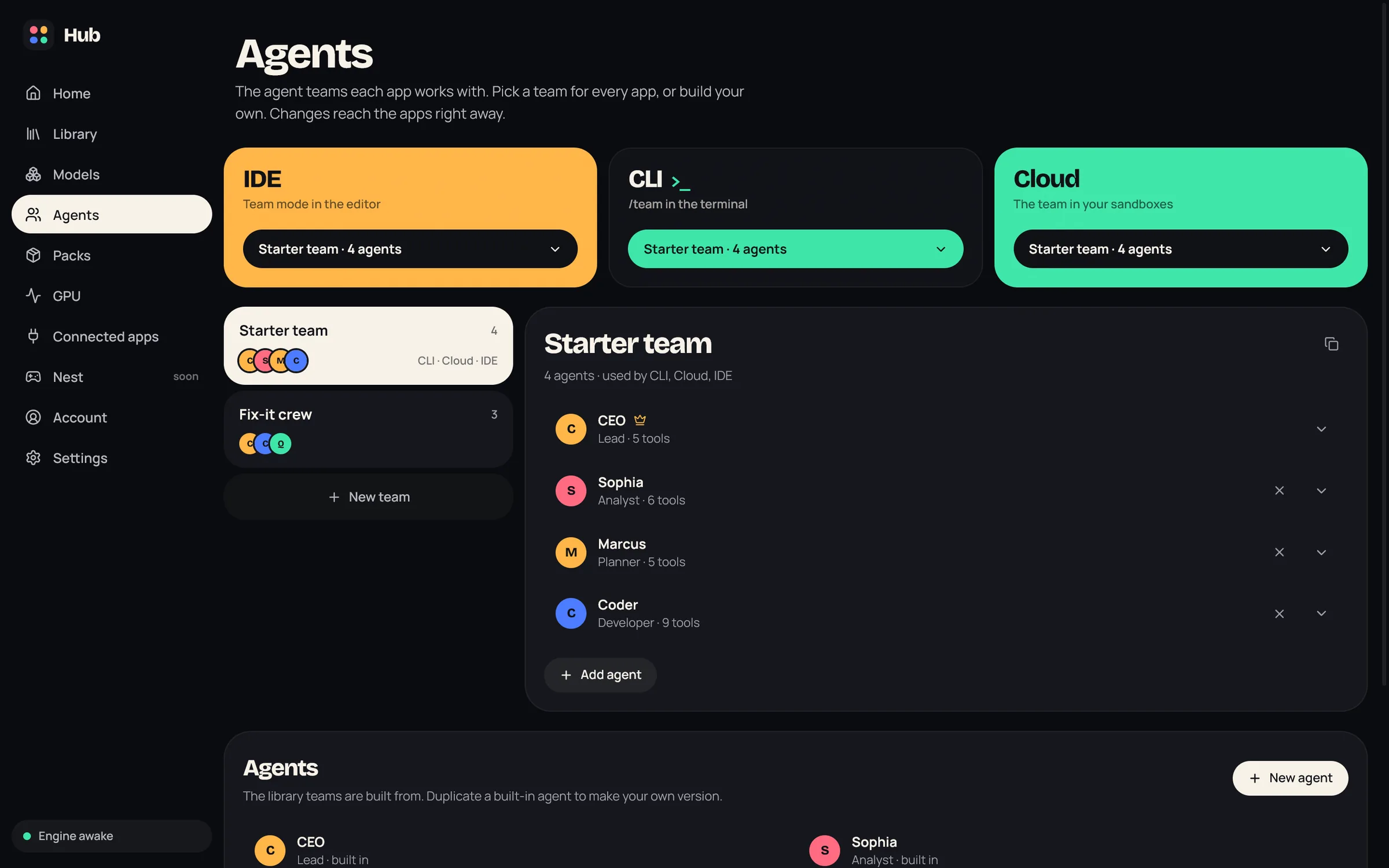
A team for each app#
The top of Hub > Agents has one card per app that runs agent teams:
| App | Where the team works |
|---|---|
| IDE | Team runs in the editor. See Chat. |
| CLI | The /team command in the terminal. See CLI. |
| Cloud | The agent team in your sandboxes. See Cloud sandboxes. |
Pick a team in each card's menu. An app without a choice uses the Starter team. The IDE can also switch its team from the team chip in the chat.
The starter team#
The built-in Starter team has four agents:
- CEO (Lead): talks to you, plans the work and hands tasks to the others. A team has exactly one lead.
- Sophia (Analyst): turns goals into specs and decisions.
- Marcus (Planner): breaks goals into small, ordered tasks.
- Coder (Developer): writes the code and runs commands.
The agent library also has UI Expert (Designer), DevOps, QA Tester and Code Reviewer. If you change the starter team, you can get the original back with Restore.
Build a team#
- 1
Create it
Choose New team. It starts as New team with a CEO and a Coder. Or use the duplicate icon on an existing team to start from a copy.
- 2
Name it
Click the name to rename the team.
- 3
Add agents
Choose Add agent, then Add from the library. Choosing a lead replaces the current lead.
- 4
Edit members
Select a member to change its name, role, instructions and tools (see below).
- 5
Save
Choose Save, or Discard to drop your changes. Delete a team you no longer need; apps that used it go back to the starter team.
What you can change on a member#
- Name.
- Role: Lead, Analyst, Planner, Developer, Designer, DevOps, QA or Reviewer. The lead's role is locked.
- Instructions: the guidance the agent follows.
- What it can do: the tools it may use: Read files, List folders, Search, Create files, Edit files, Create folders, Delete files, Move files, Run commands, Stop processes, Write plans, Edit plans and Hand off to the team.
There is no model per agent. Every agent in a run uses the model of that window or conversation: the one you picked in the app, else the app's default, else the Hub default. See Model choice.
The agent library#
Below the teams, the Agents section lists the agents teams are built from. Built-in agents are marked built in and yours are marked yours. Duplicate a built-in agent to make your own version, or choose New agent.
Roles and their tools#
A role sets the most an agent may do. You can take tools away from an agent, but the agent runtime never gives it tools its role does not allow.
| Role | What it does | Tools the role allows |
|---|---|---|
| Lead | Talks to you, plans, delegates and writes the final summary. | Read and search files, hand off to or ask another agent |
| Analyst | Specs, decisions and standards. | Read, create and edit files, create folders |
| Planner | Small tasks in the right order. | Read and search files, hand off |
| Developer | Application code, APIs, refactors. | All file tools, delete folders, run commands |
| Designer | UI and UX. No backend work. | File tools, no commands |
| DevOps | Dependencies, builds, ports and configs. | All file tools, delete folders, run commands |
| QA | Builds and tests. | Read, create and edit files, create folders, run commands |
| Reviewer | Read-only review. | Read and search files, hand off |
Every agent can also ask you a question and mark its task as done. Deleting, moving, running commands and MCP tools still need your approval. See Approvals and safety.
Limits by plan#
| Free | Code Pro, All Apps Pro | Team | |
|---|---|---|---|
| Agents in a team, lead included | 4 | 10 | 25 |
| Parallel agents (most) | 2 | 5 | 8 |
| Custom roles, instructions and tools | Default roles only | Yes | Yes |
On Free, each default role keeps its standard tools and instructions. A team with custom roles is refused with Custom roles need the Pro plan. The parallel agents setting is in the IDE's settings. See Plans and account.
FAQ#
Can Studio or Workshop use my teams?
No. Teams are for the IDE, the CLI and Cloud. Workshop builds with its own agent.
I removed an agent from the team chip in the IDE. Why did the CLI's team change too?
Teams live in the Engine. If the IDE and the CLI use the same team, a change in one shows in the other.
Can I remove the lead?
No. Every team has exactly one lead. Adding a new lead from the library replaces the old one.