Cloud
Cloud sandboxes
Jennefer Cloud gives your agents disposable Linux machines. Create a sandbox from a template, pick a size, work with the agent team, use the terminal and preview, and manage hours and limits.

On this page
Jennefer Cloud is a separate app for cloud sandboxes: small Linux machines with your project, where agents install, run and test without touching your computer. A sandbox pauses by itself when you stop using it.
Sign in#
Sandboxes belong to your Jennefer account. Sign in once in the Hub. While you are signed out, Cloud shows Sign in to use Cloud. with Sign in with Jennefer Hub.
Create a sandbox#
- 1
Open New sandbox
Choose New sandbox. One window holds everything.
- 2
Pick a template
Search or browse by category. You can install anything later from the terminal.
- 3
Name it and pick a machine
Give it a name (up to 40 characters) and a size. Optionally add Coding tools in the terminal.
- 4
Create it
Choose Create sandbox. Cloud shows Setting up while it starts the machine and prepares the template. This takes up to a minute.
If two-factor authentication is on for your account, creating a sandbox asks Confirm it's you. Choose Continue in browser, enter your authenticator code, then come back and create the sandbox again.
Templates#
Blank, Next.js, Vite + React, Node API, Vue + Vite, SvelteKit, Astro, NestJS, Django, Streamlit, Discord bot, Python API and Import from Git. A template that is not ready yet shows Not ready on the server yet.
Import from Git clones a public repository over HTTPS from github.com, gitlab.com, bitbucket.org or codeberg.org. The agent reads the project and sets it up. Private repositories are not supported.
Machine sizes#
| Size | CPU | Memory | Cloud hours used per hour |
|---|---|---|---|
| Basic | 2 vCPU | 2 GB | 1 |
| Standard | 4 vCPU | 4 GB | 2 |
| Performance | 8 vCPU | 8 GB | 4 |
Other combinations of 2, 4 or 8 vCPU and 2, 4 or 8 GB are under Custom size…. Sizes above Basic need Cloud Pro or Cloud Team and show a lock with (Pro) otherwise. Bigger machines use Cloud hours faster.
Coding tools in the terminal#
On Cloud Pro and Cloud Team you can install coding command-line tools in the sandbox: Claude Code, Codex CLI, Gemini CLI, GitHub Copilot CLI and opencode. Each needs its own API key. Keys go to that sandbox only, as environment variables, and Jennefer does not keep them.
Working in a sandbox#
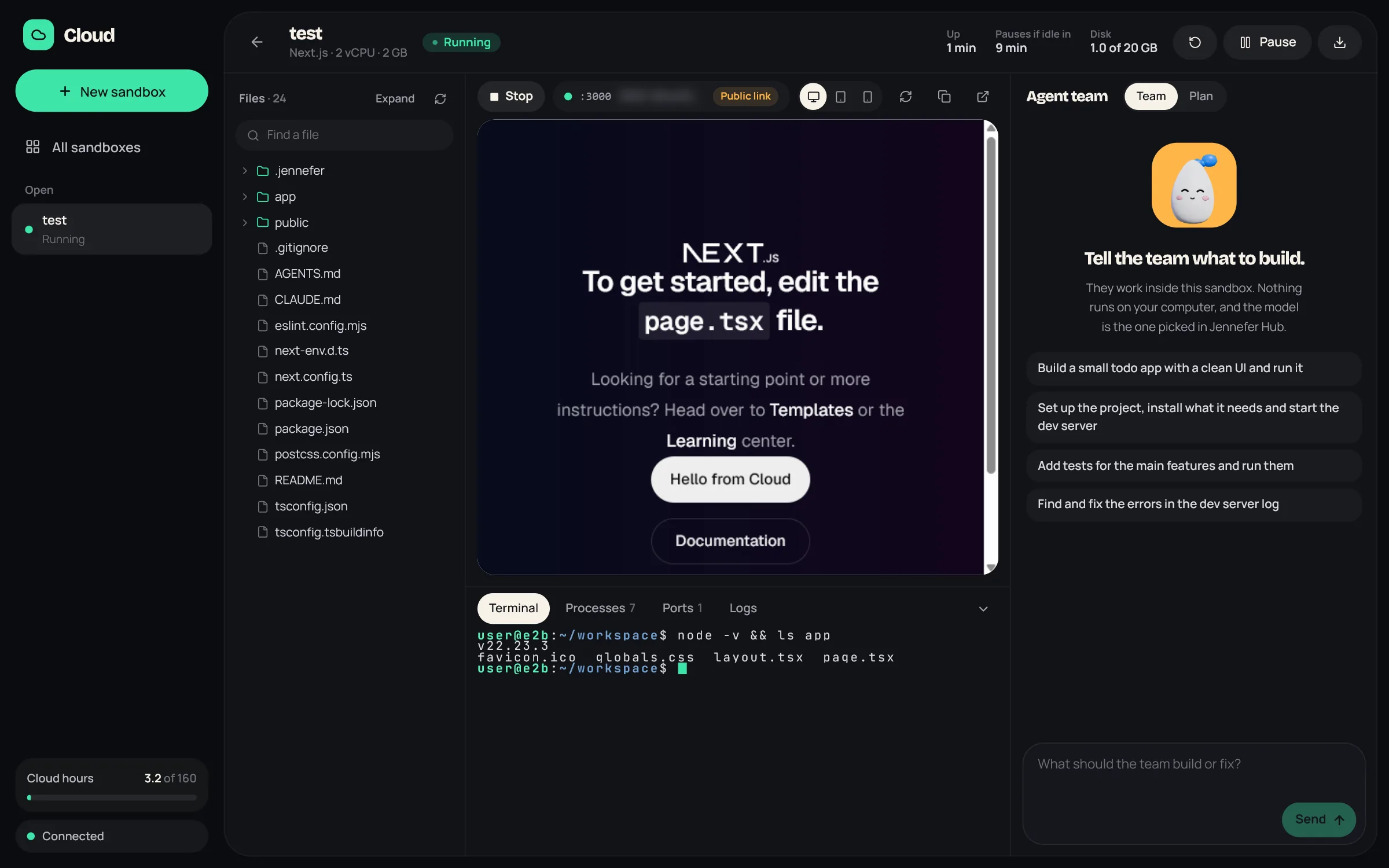
- The header shows how long the sandbox has been up, when it pauses if idle, and its disk use, with Restart (files stay, programs start again), Pause / Resume and Download.
- Files is a read-only tree with Find a file and a file viewer.
- The bottom panel has Terminal, Processes, Ports and Logs. The terminal is a real shell in the sandbox, with a button for each coding tool you installed.
- Preview runs the template's dev server with Run and Stop, and shows the app in Desktop, Tablet or Phone width, with Reload, Copy link and Open in browser.
The agent team in Cloud#
The Agent team panel works inside the sandbox. It uses the team assigned to Cloud in Hub > Agents. The model chip in the team composer sets the model and effort for this window; without a pick, Cloud uses its default from Hub > Models. See Model choice.
- Team plans, builds and checks. Plan only makes a plan and changes nothing.
- There are no approval cards in Cloud. The sandbox is isolated and disposable, so agents run commands and change files there without asking.
- One run at a time across all your sandboxes. Resume a paused sandbox to work with the team.
- Conversations are kept on this computer, per sandbox.
Model requests from a Cloud run come back to your computer and go to your Engine, so your computer must stay on and connected while the team works.
Build from your phone#
In Jennefer Mobile, Build by chat on a sandbox asks one agent to build or change an app there. It uses an endpoint kept in your account, so it works while your computer is off. Your provider bills the model, the sandbox uses Cloud hours, and no Credits are used. Sandboxes are not created from the phone. See Build by chat on your phone.
Add files from other apps#
Use Send to > Cloud in Hub > Library or Studio. Cloud shows Sent from the app, a sandbox picker and a folder (default public). Choose Put it there. The sandbox must be running, and a file can be up to 25 MB.
Lifecycle and limits#
- Hours used: running time is counted by the second and multiplied by the size, so an hour of a Standard sandbox uses 2 Cloud hours.
- Idle pause: a sandbox pauses after 10 idle minutes. Paused time uses no Cloud hours, and files are kept.
- Session length: one running session lasts up to 60 minutes on Cloud Starter and up to a day on Cloud Pro and Team. Resume to continue.
- Cleanup: a paused sandbox is deleted after 14 days. The card says how many days are left. Deletion is permanent.
- Storage: up to 12 sandboxes at a time. Disks hold 5 GB on Starter and 20 GB on Pro and Team.
- Capacity: if the service is busy, Cloud asks you to try again in a few minutes.
Download your files#
Download saves the project folder as one .tar.gz file in your Downloads folder, without node_modules and build folders. A paused sandbox wakes up briefly to pack it, which uses no Cloud hours. Downloads need no Cloud plan, but are limited to 10 a day, one a minute, and 300 MB.
Cloud plans#
| Cloud Starter | Cloud Pro | Cloud Team | |
|---|---|---|---|
| Cloud hours | 30 a month | 100 a month | 80 per seat, shared by the team |
| Running at once | 1 | 4 | 3 per person |
| Longest session | 60 minutes | A day | A day |
| Larger sizes and coding tools | No | Yes | Yes |
| Extra hours | No: sandboxes stop at the limit | Yes, with a spend limit | Yes, with a spend limit |
Prices are on the Pricing page. Extra hours and the spend limit are explained in Plans and account.
FAQ#
Does closing Cloud stop my sandbox?
The sandbox keeps its state and pauses when idle. A team run stops, because your computer answers its model requests.
Can I manage sandboxes from my phone?
Jennefer Mobile can start and pause sandboxes, open their previews and build by chat in them, when that feature is open for your account.
Will I lose my files if my plan ends?
Nothing is deleted when a plan ends. Paused sandboxes still follow the 14-day cleanup, so download what you need.