Hub
GPU
Every Jennefer app asks the Engine before it uses your GPU, so two apps never fight over it. Learn how local models take turns, what the wait lines in the apps mean, and what Hub > GPU shows.

On this page
Your local models, Studio images and Studio videos all need the GPU, and one GPU can do one of them at a time. The Engine keeps a queue: every app asks before it uses the GPU, and jobs take turns. Chat goes first, then images, then video. Endpoint models do not use your GPU and never wait in the queue.
Hub > GPU shows the queue. It is for watching only: it has no buttons.
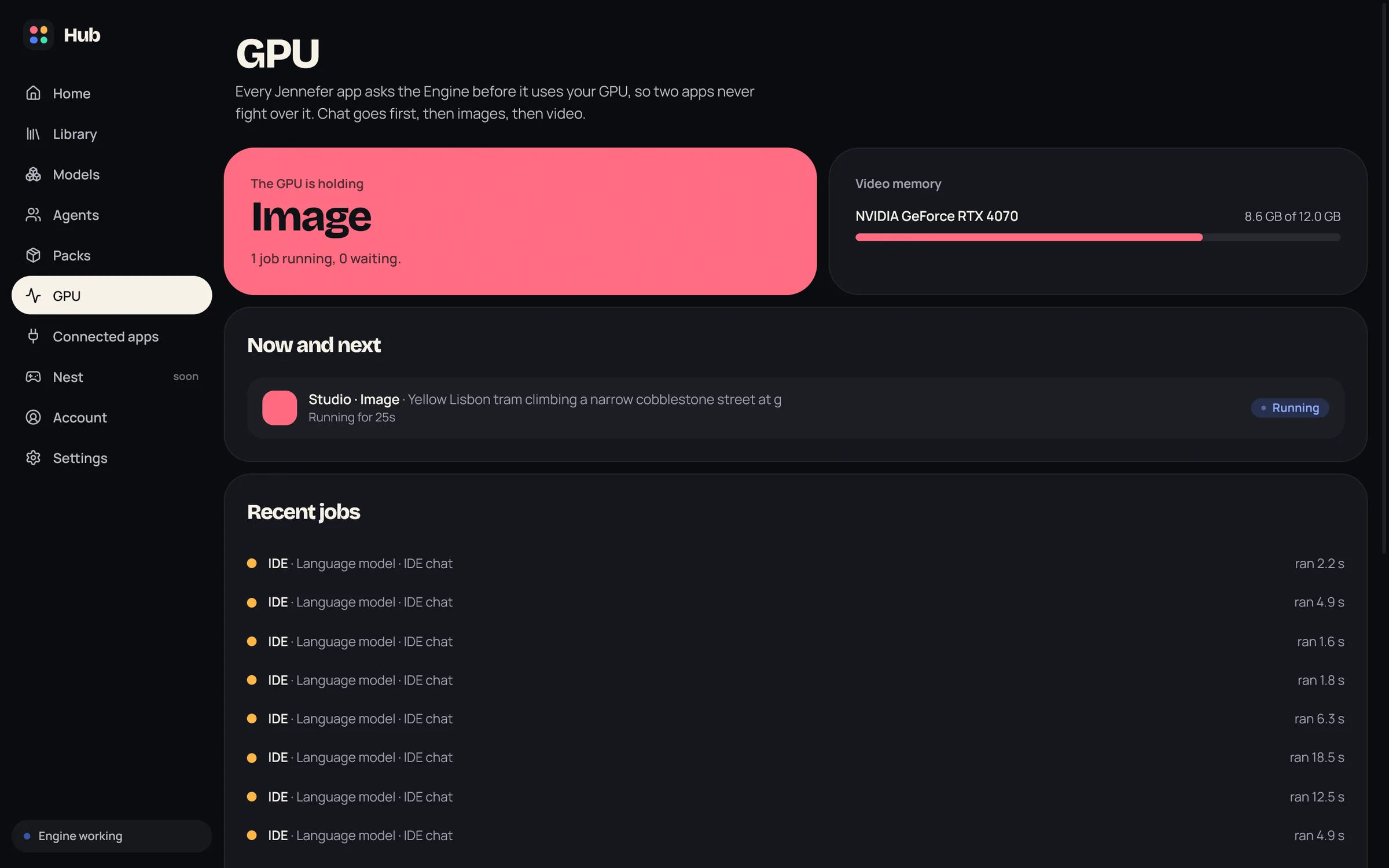
What the screen shows#
| Part | What it shows |
|---|---|
| The GPU is holding | What has the GPU now: Language model, Image, Video or Nothing, with how many jobs run and wait. When it is free: Free for whoever asks next. |
| Video memory | Memory used out of the total, load and temperature for each GPU. Before the first model runs it says Run a model once to see your graphics card here. |
| Now and next | Each job with its app and the model it uses, and Running, Loading while the model loads, or its place in line, for example #2 in line. |
| Recent jobs | Finished jobs with how long they ran and waited, or cancelled while waiting, or stopped: no progress. |
How local models take turns#
- Requests for the model that is in memory share the GPU and run together, also from different apps and windows.
- A request for another local model waits until the running answers end. Then the Engine unloads the model, loads the other one and answers.
- Requests are served in the order they arrive. Hangar bots wait behind your other work.
- Endpoint models skip the queue. They answer at the same time as a local model.
Switch grace#
Agents send many short requests in a row. So the loaded model does not lose the GPU between two steps, the Engine waits up to 5 seconds after its last answer for the next request of the same session before it switches. A waiting model is held back at most 20 seconds from when it joined the queue. There is no wait when the other model is already in memory.
What the apps show while they wait#
While a request waits for the GPU or a model loads, the app says why:
| Line | Meaning |
|---|---|
| Waiting for the GPU: CLI is answering with Gemma 4 12B | Another app uses the GPU with another model. |
| … another IDE session is answering with … | Another window of the same app uses it. |
| … CLI may continue with … | The switch grace: the other session may send its next step first. |
| … Studio is making an image | An image or video job holds the GPU. |
| (number 2 in line) | Your place in the queue. |
| Loading Qwen3.5 9B (about 20 s) | The model is loading. The time comes from its last load, or from its size. |
| App | Where the line shows |
|---|---|
| CLI | In the working line. |
| CLI+ | In an amber line above the input. |
| IDE | In an amber line above the message box, for that window only. |
| Workshop | Under the running build. |
| Cloud | Above the team's message box. |
| Mobile | In the answer bubble, in amber, with the seconds counting down. See Mobile. |
Studio and your models#
- When Studio starts an image or video job, the chat model is unloaded from the GPU for a while. The next chat request loads it again, which can make that first answer slower.
- A chat request stops Studio's image engine, which then loads again for the next job.
- Studio's image engine stops by itself after 5 idle minutes and gives the memory back.
- A job that stops reporting progress is removed from the GPU after about a minute, so it cannot block the queue.
- Studio shows its own place in the queue, for example Waiting for the GPU. Hub > Home shows it too, under Right now.
FAQ#
Can I cancel a job from Hub > GPU?
No. Cancel it in the app that started it, for example with the X on a Studio card.
Why is my card not listed?
Run a model once. The Engine reads the card's details when the runtime starts.
Why does my CLI wait while the IDE answers?
They use two different local models, and one GPU runs one model at a time. Pick the same model in both, or use your endpoint in one.
Do endpoint models slow down my local model?
No. They run on your provider's servers and never take the GPU.